AI credits are used to create and edit presentations in Decktopus.
How credits are used
Generating 1 slide costs 5 credits
Editing a slide with AI or Edit Text costs 5 credits per edit
The credit cost is always shown before you apply any change
You receive AI credits with your Decktopus AI subscription.
To see what’s included in each plan, visit our Pricing Page.
You can also purchase additional credits without a subscription. A pop-up will appear when you need credits.
Credit packages never expire, so you can use them at your own pace.
Available packages:
40 credits / ~8 slides / $4.99
100 credits / ~20 slides / $8.99
300 credits / ~60 slides / $19.99
700 credits / ~140 slides / $34.99
1,500 credits / ~300 slides / $59.99
3,000 credits / ~600 slides / $99.99
8,000 credits / ~1,600 slides / $249
18,000 credits / ~3,600 slides / $529
36,000 credits (MAX) / ~7,200 slides / $999
You can easily see:
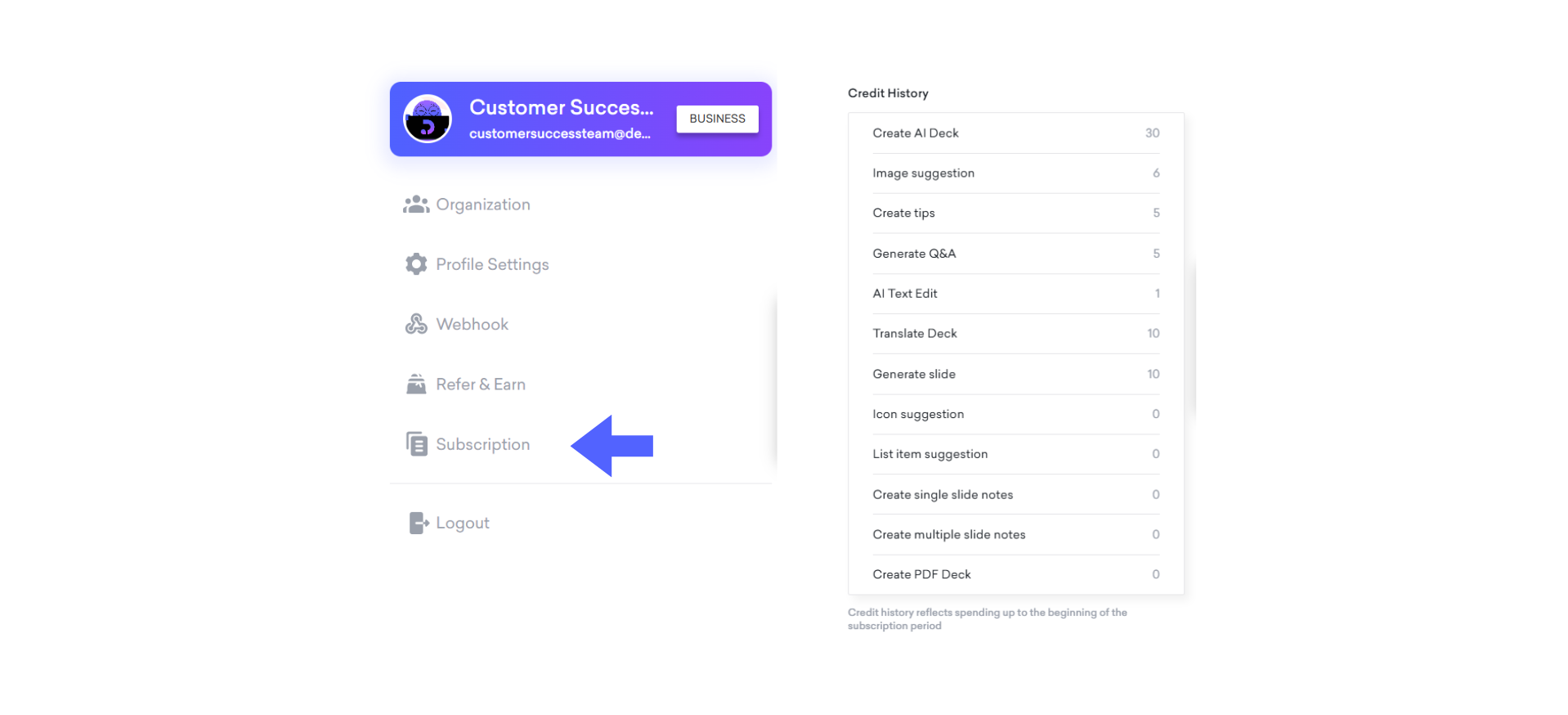
How many credits you have
How you’ve used them
👉 Just head to the Subscription Panel and check on Credit History to view all your credit activity.

Feel free to reach out for any inquiries about plans, pricing, or any other matter. You can contact us via email at [email protected] or connect with us through live chat. We're here to help!
